Sphinx is a great full-text search engine
with many amazing features, but there is one feature missing that would
make it even better: the ability to directly index Word, Excel,
PowerPoint, PDF files. How one can index these kinds of documents with
Sphinx is something that is often asked in the Sphinx forum. Today I’d
like to show you an easy way to extract text from these document types
and store them in a Sphinx real-time index from your .NET application.
There are a bunch of tools and libraries out there that claim to be able
to extract text from various document formats. As it is a pretty hard
task to support many formats and extract text reliably, the quality of
each library varies greatly. One tool that stands out is the
Apache Tika™
toolkit. It is a Java library that
“detects and extracts metadata and structured text content from
various documents using existing parser libraries.”
And it is really very good at it. Amongst
others, it supports Microsoft
Office, Open Document (ODF), and PDF files. But wait, I said Java
library, didn’t I? “What am I supposed to do with a Java library in my
.NET application?”, you might ask. Well, we’ll just convert it from Java
to .NET using
IKVM.NET. IKVM.NET is
a .NET implementation of a Java Virtual Machine (JVM) which can be used
as a drop-in replacement for Java. And it comes with a Java bytecode to
CIL translator named ikvmc that we can use to build a .NET version of
Apache Tika. In the next section, I’ll walk through the steps required
to do this. At the end of this article you can download a complete
sample application that uses Tika to extract text from some files and
stores them in a Sphinx real-time index via SphinxConnector.NET.
Creating a .NET Version of Apache Tika
To create your own .NET version of Apacha Tika you need to:
- Download
IKVM.NET
- Download the .jar file from the
Tika
project page (the current version at the time of writing is 1.3)
- Extract IKVM.NET to a folder of your choice
- Optional: Add the bin folder of IKVM.NET to your %PATH% variable
- Execute the following command (add/change the paths to ikvmc.exe and
tika-app-1.3.jar if needed):
ikvmc.exe -target:library -version:1.3.0.0 -out:Apache.Tika.dll tika-app-1.3.jar
Let’s walk through the command line parameters: With –target:library
we tell ikvmc to convert the jar to a class library. This is needed
because the jar file is also usable as a standalone console/gui
application, i.e. contains a main() method, which by default would
cause ikvmc to generate an exe file. Next, we specify the version for
our output DLL because otherwise ikvmc would set the version to 0.0.0.0.
Finally we specify the output file name via –out: and the path to the
Tika jar file.
After hitting Enter, ikvmc starts to translate the Java library to .NET.
It’ll output a lot of warning messages, but will eventually finish and
produce a working DLL. Note that if you want to sign the output assembly
you can do so by specifying a key file via the -keyfile: command line
option.
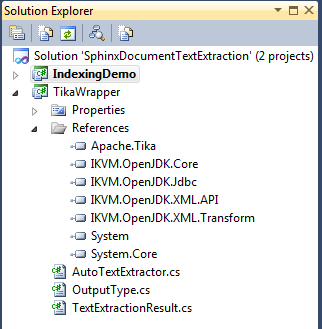
Now that we've created a .NET library of Tika, we can start extracting
text from documents. I’ve created small wrapper that provides methods to
perform the extraction. To build the wrapper DLL we need to add
references to a couple of IKVM.NET libraries:
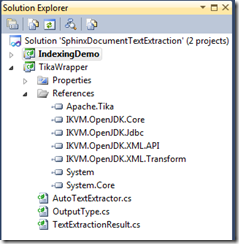
Note that you need to reference more of IKVM.NET’s DLL’s in an
application that uses Tika, these are just the required files to
compile the wrapper project.
The AutoTextExtractor class which handles the extraction of text from
files and binary data (useful if your documents are stored in a DB) and
the TextExtractionResult class are based on these by
Kevin Miller:
public class AutoTextExtractor
{
  public TextExtractionResult Extract(string filePath,OutputType outputType = OutputType.Text)
  {
      return Extract(System.IO.File.ReadAllBytes(filePath), outputType);
  }

  public TextExtractionResult Extract(byte[] data, OutputType outputType = OutputType.Text)
  {
      var parser = new AutoDetectParser();
      var metadata = new Metadata();

      using (Writer outputWriter = new StringWriter())
      using (InputStream inputStream = TikaInputStream.get(data, metadata))
      {
          parser.parse(inputStream, GetTransformerHandler(outputWriter, outputType),
              metadata, new ParseContext());

          return AssembleExtractionResult(outputWriter.toString(), metadata);
      }
  }

  private static TextExtractionResult AssembleExtractionResult(string text, Metadata metadata)
  {
      Dictionary<string, string> metaDataResult = metadata.names().
          ToDictionary(name => name, name => String.Join(", ", metadata.getValues(name)));

      string contentType = metaDataResult["Content-Type"];

      return new TextExtractionResult
      {
          Text = text,
          ContentType = contentType,
          Metadata = metaDataResult
      };
  }

  private TransformerHandler GetTransformerHandler(Writer outputWriter, OutputType outputType)
  {
      var factory = (SAXTransformerFactory)TransformerFactory.newInstance();
      TransformerHandler handler = factory.newTransformerHandler();
      handler.getTransformer().setOutputProperty(OutputKeys.METHOD, outputType.ToString());
      handler.setResult(new StreamResult(outputWriter));

      return handler;
  }
}
Here’s the TextExtractionResult class:
public class TextExtractionResult
{
    public string Text { get; set; }

    public string ContentType { get; set; }

    public IDictionary<string, string> Metadata { get; set; }
}
And the OutputType enumeration:
public enum OutputType
{
    Text,
    Html,
    Xml
}
Demo Application
I’ve created a small demo application that contains a DLL that wraps
Tika with the help of the aforementioned classes, and a console
application that demonstrates how to extract and store the contents of
some files in a Sphinx real-time index with SphinxConnector.NET. The
code that does the extraction is pretty simple:
private static SphinxDocumentModel[] GetDocuments()
{
    AutoTextExtractor textExtractor = new AutoTextExtractor();

    int id = 1;

    return (from filePath in Directory.EnumerateFiles(@"..\..\..\..\testfiles")
            select new SphinxDocumentModel
            {
                Id = id++,
                FileContent = textExtractor.Extract(filePath).Text,
                FilePath = Path.GetFullPath(filePath)
            }).ToArray();
}
I’ll omit the code that saves the documents to the index, as it is
straightforward. Tip: if you are working with big files you might have
to increase Sphinx’
max_packet_size setting.
The archive contains all required libraries so it’s pretty big (IKVM.NET
and Tika alone take up about 50 MB in space).
Downloads:
[1] Zip-Package (22 MB)
[2] 7z-Package (18 MB)